

There's a very useful function in SmartZone - you can ssh to any connected and online AP from SmartZone cli.
Example: executing one command:
Go to SmartZone cli through ssh, go to admin mode with 'ena' and give a command in following way:
remote ap-cli c8:03:f5:0E:06:c0 "get scg ip"
------ SCG Information ------
 SCG Service is enabled.
 AP is managed by SCG.
 State: RUN_STATE
 Server List: 10.0.12.140,194.204.45.210
 SSH tunnel connected to 194.204.45.210
 Failover List: Not found
 Failover Max Retry: 2
 DHCP Opt43 Code: 6
 Server List from DHCP (Opt43/Opt52): Not found
 SCG default URL: RuckusController
 SCG config|heartbeat intervals: 30|30
SCG gwloss|serverloss timeouts: 7200|36000OKThis shows the command is executed in AP and the result is sent to SmartZone cli.
Example: executing several commands:
remote ap-cli C8:03:F5:0E:06:C0 "ping 192.168.108.142 ; ping 192.168.108.14"
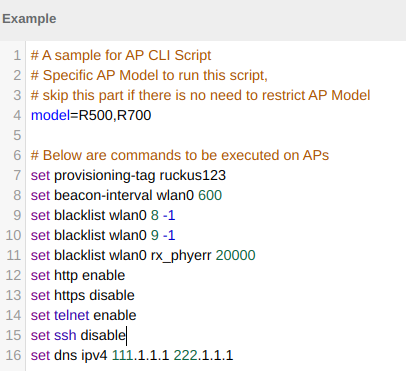
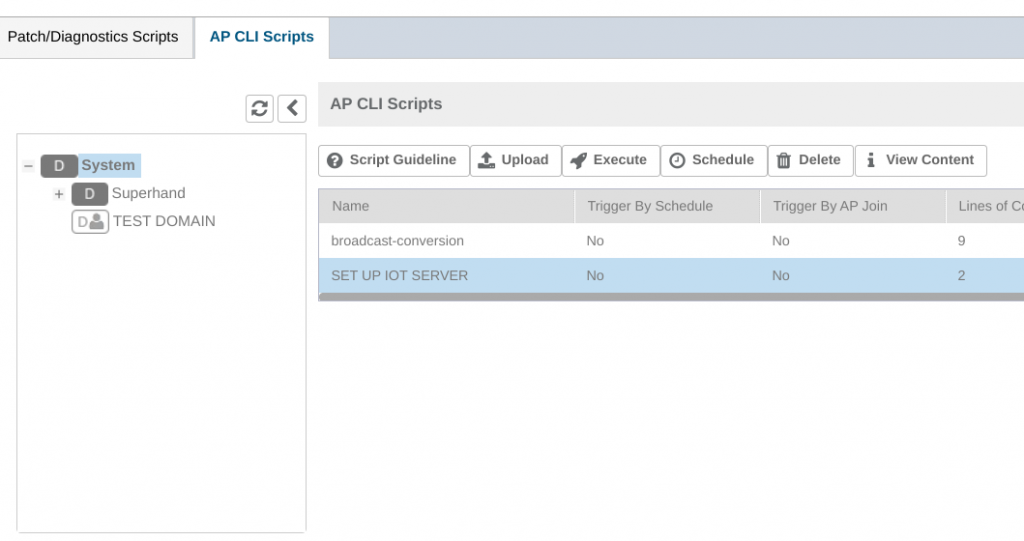
A sciprt can be executed at once in many AP's and it's done from SmartZone WebGUI. Go to Diagnostics->Scripts->AP CLI Scripts. This function allows to execute a script on one domain with possibility to time it on a convenient moment.
Script can limit the commands to specific AP models or specify other limitations:
Take notice, that there's a default blacklist of commands you are not allowed to use in a script to prevent the more riskier actions of changing controller ip for example.
Since SmartZone 5.1 the following commands are not allowed in scripts:
In case of still needing those commands, please contact Ruckus support to help you with special privileges.